"Your documents, ready for any form. Offline."
Kaagaz (Hindi: "paper") is a local, offline document assistant for Indian forms. Every scholarship, admission and exam portal wants the same documents in different formats ("photo 3.5 × 4.5 cm, JPG, 20–50 KB", "marksheet PDF under 200 KB"). Kaagaz reads your folders, recognises each document with Gemma 4 E4B running locally through Ollama, and when you paste a portal's upload instructions it builds a folder of files converted, cropped, compressed and renamed to the exact rules, then re-opens and measures every output (PASS / WARN / FAIL with real numbers). It flags missing and expired documents before you start the form.
Built for the DEV Hacktoberfest Open-Source AI Challenge, Week 3 ("Slow and Steady").
Gemma 4 reads the portal's rules and labels your files. Plain Python picks, converts and measures every output. All on the laptop.
Applying for scholarships, college admissions, and competitive exams usually means an agonizing maze of rejected uploads.
Phone photos are several MB and the wrong shape. Shrinking them by hand usually ends up too blurry, too small in KB, or the wrong size in cm.
To hit a KB limit, people upload marksheets and ID documents to random online compressors.
An income certificate issued before the form's cutoff date can slip through the upload and only get caught later, at document verification.
Five steps. The AI decides what; plain code does the work and checks it.
Read-only folder scan. Unmodified files indexed with SHA-256 caching to skip re-reading.
Gemma 4 returns schema-checked JSON. Ambiguous files route to an interactive review queue.
Raw text from portal instructions is parsed offline into an editable checklist table.
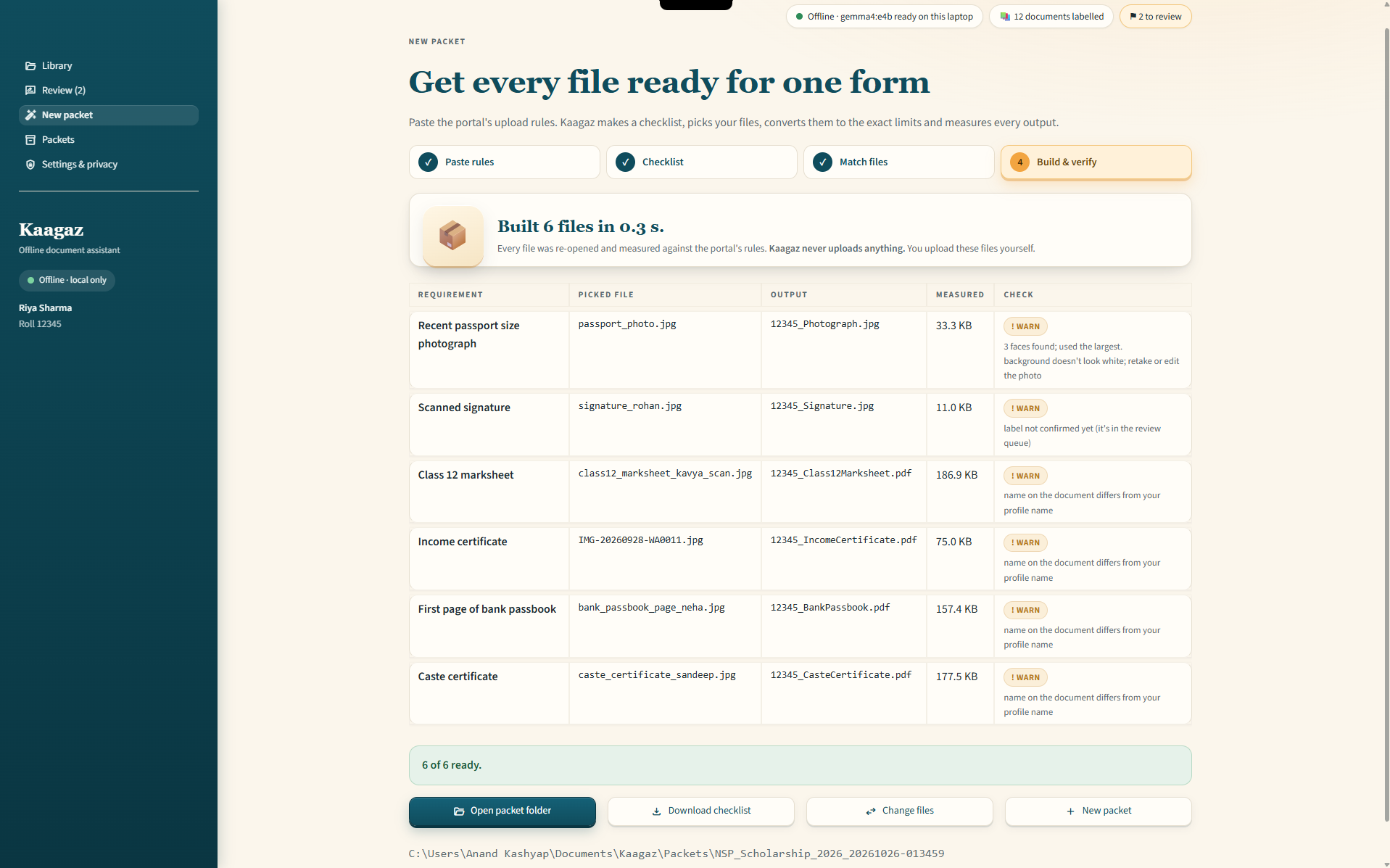
Plain Python converts, crops, compresses and renames each file to the exact rules.
Every output is re-opened and measured: format from its first bytes, KB, pixels, pages.
Numbers from real runs on my laptop (RTX 4050 Laptop GPU, 6 GB).
| Measurement Metric | Observed Value / Verification | Status |
|---|---|---|
| GPU memory during a vision call | 4.5 GB of 6 GB (RTX 4050 Laptop) | Measured |
| Time per document (warm) | median 2.1 s, p95 3.0 s | Measured |
| Building a 6-file packet | 0.3 s | Measured |
| Requirement parser on the specimen rules text | 27 / 27 limits (v1 was 22 / 27) | Smoke test |
| Dev set (13 specimen documents) | 13 / 13 handled correctly (11 labelled, 2 sent to review) | Smoke test |
Specimen and dev-set numbers come from documents I made myself, so they are a smoke test, not a benchmark.
Kaagaz only talks to the AI model running on your own machine. It never uploads anything.
The only network connection is to Ollama on this laptop. If the model host is set to anything else, Kaagaz refuses to start.
Kaagaz has no analytics code, and Streamlit's own usage statistics are turned off. The app only listens on 127.0.0.1.
Aadhaar, PAN and account numbers are kept as the last 4 digits only (e.g. XXXX 9012). A scrubber masks them in every saved field.
Kaagaz never changes, moves or deletes your files. Outputs go to a separate Packets folder.
Everything runs natively in Windows PowerShell. Follow these prerequisites and steps.
(.venv) before executing any kaagaz commands.
ollama pull gemma4:e4b
git clone https://github.com/kashyapanand21/kaagaz.git
cd kaagaz
py -3.12 -m venv .venv
.venv\Scripts\Activate.ps1
pip install -e ".[ui,dev]"
kaagaz doctor
kaagaz ui
Six screens. Here's what each one is for.
Check the local AI status, select your monitored folders (e.g. Scans, WhatsApp downloads), input your candidate name and roll number, then click Start.
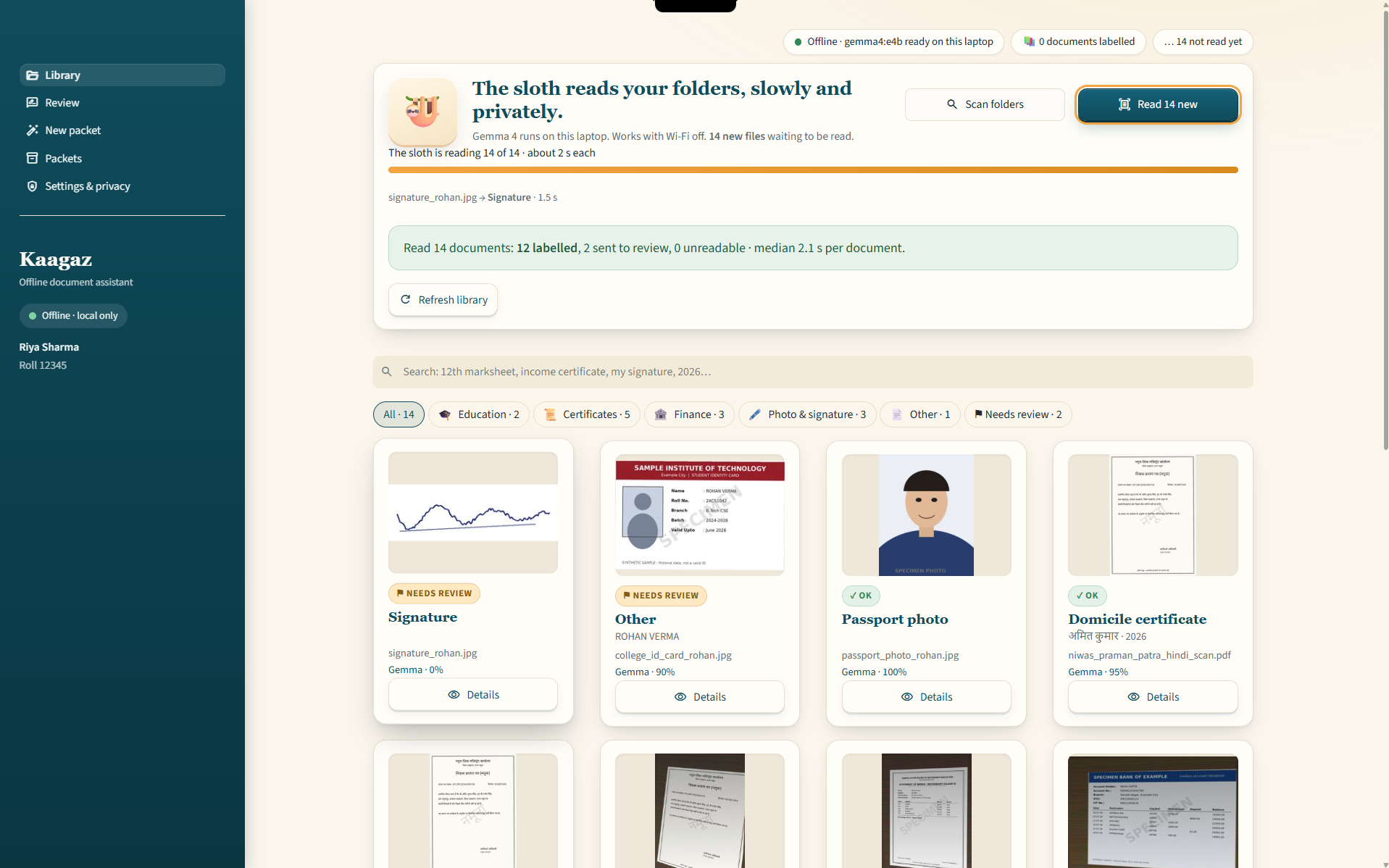
Scan and index your documents. Search by name like "12th marksheet", apply filters, and open any card to see what Gemma read and how sure it was.
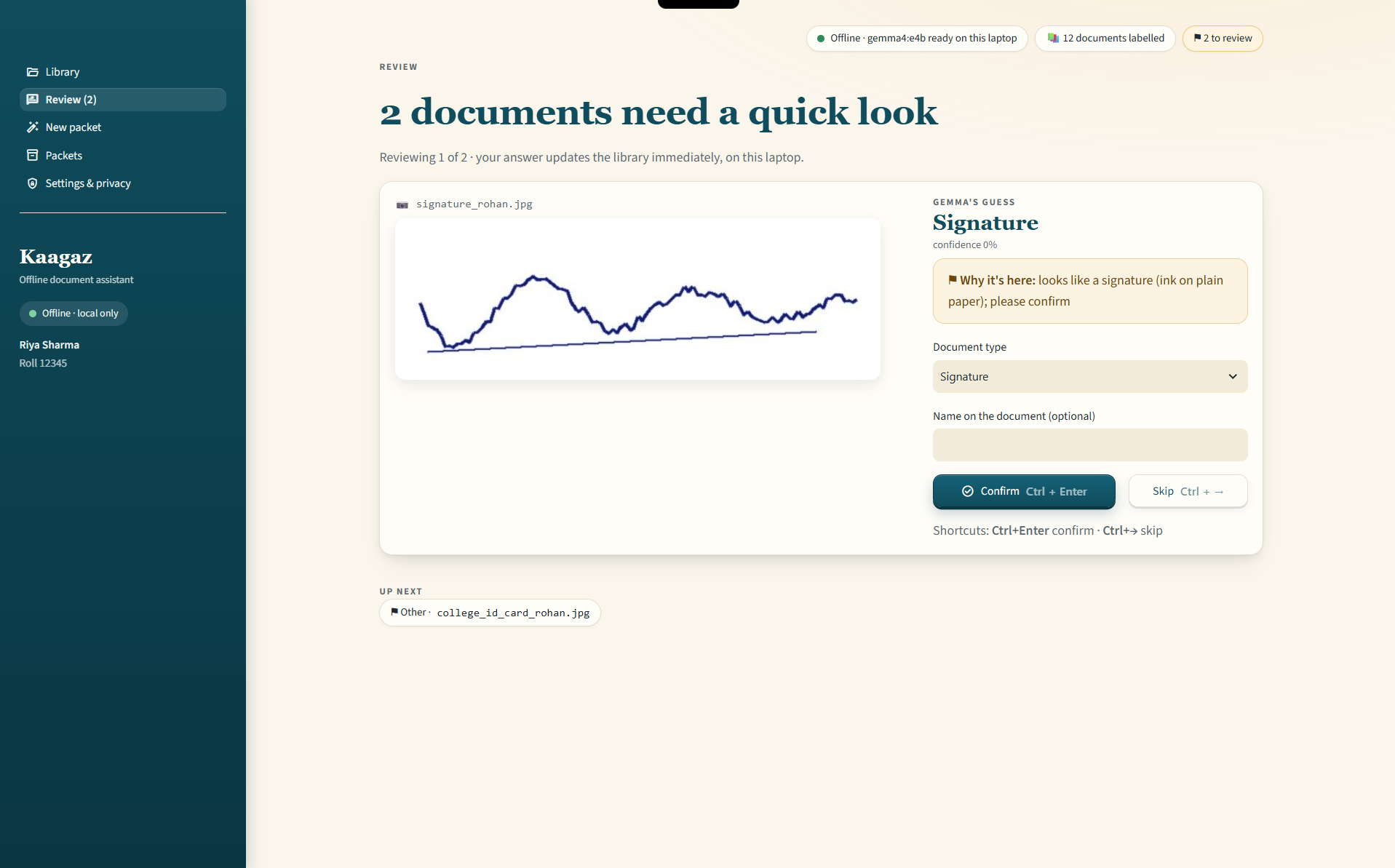
Quickly confirm or fix low-confidence labels with speedy keyboard shortcuts:
Ctrl+Enter to confirm label or Ctrl+→ to skip.
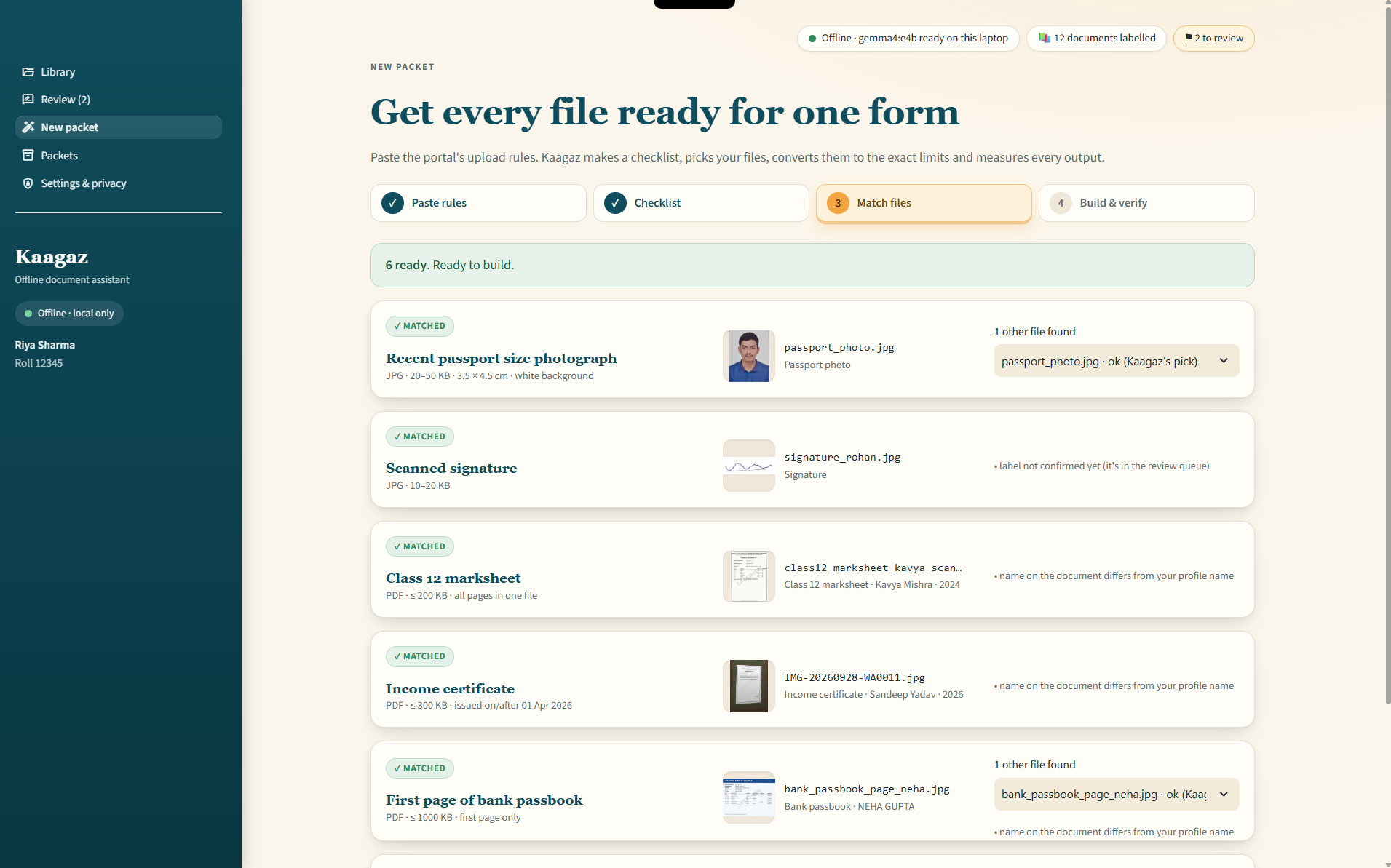
Four-step guided pipeline: Paste portal instructions → Checklist review → Match files against rules → Build verified outputs.
Every packet you've built (e.g. NSP Scholarship 2026). Open its folder, or rebuild it with today's library.
Choose folders, set your name and roll number, check the local model, or delete all of Kaagaz's own data.
Everything the app does is also a command:
Fast fixes for common local runtime and configuration hurdles.
kaagaz is not recognized as an internal or external command.venv\Scripts\Activate.ps1(.venv) before re-running
kaagaz.
ollama pull gemma4:e4b
ollama pssetx OLLAMA_LLM_LIBRARY cuda_v12, start
Ollama again and open a new terminal. If that doesn't help, reinstall an earlier Ollama release.
What Kaagaz does not yet do. No overpromising—clear, factual transparency.
Hindi names on certificates (e.g. रिया शर्मा) do not yet automatically cross-match against an English profile name (Riya Sharma). For now Kaagaz shows a “name differs” note instead.
Photo backgrounds are strictly checked for compliance (e.g. verifying white backdrop), but are not replaced. Retake the photo if the check fails.
Separate phone photos of the front and back of ID cards or marksheets are not merged into a single multi-page PDF automatically yet. For now, combine them into one PDF before scanning.
The initial release is tuned and tested specifically for Windows 11 with NVIDIA hardware. macOS and Linux are untested.